Custom fields
The Custom fields page empowers you to tailor your Help Desk to match your unique business processes. By extending tickets and customer profiles with additional fields, you ensure that your team collects the exact information needed for fast, accurate, and personalized support. Whether you’re tracking internal workflows, customer preferences, or industry-specific data — custom fields give you the flexibility to build the perfect support experience.
You can create two types of custom fields:
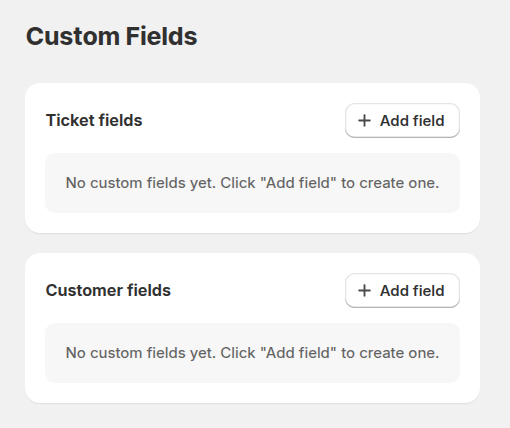
- Ticket fields – displayed in the Ticket fields section. These fields help agents capture important details when creating or updating tickets. Use them to streamline workflows, enforce required data, or provide structure for complex support processes.
- Customer fields – displayed in the Customer fields section. These fields store additional customer attributes, helping your team deliver more informed, personalized communication.
Custom field settings
Each field can be configured to fit your data requirements and user workflow:
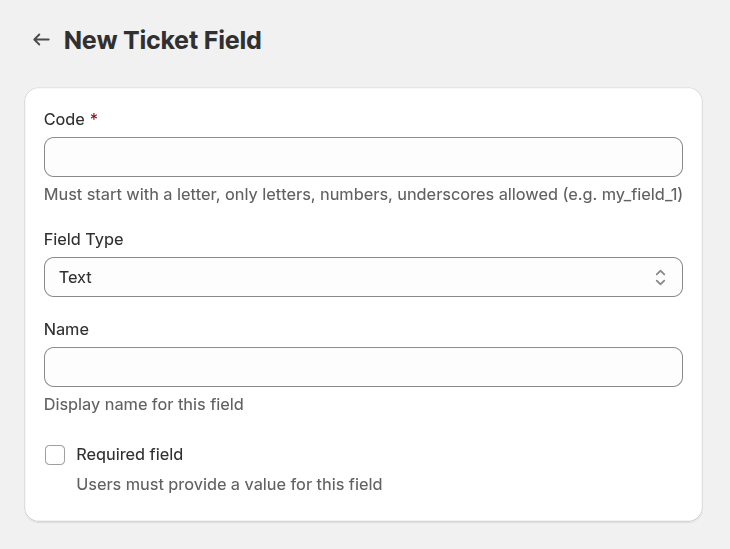
Code: a unique technical identifier. Must start with a letter and contain only letters, numbers, or underscores.
Field type: defines how the field is displayed and what type of input it supports. Available types:
- Text – simple one-line input for short details.
- Textarea – multi-line input for extended notes or descriptions.
- Number – for quantities, IDs, or numeric values.
- Date – standardized date format with a calendar picker.
- Select – dropdown list of predefined options, perfect for categorization.
- Checkbox – a yes/no toggle for quick decisions.
- Hidden – internal field used for background processes or automated values.
- Label – read-only text for highlighting important information.
Name: the user-friendly label displayed to agents or customers.
Required Field: enforce data completeness by making the field mandatory before agents submit or update a ticket.