Departments
Manage the configuration of individual support departments to streamline ticket assignment, notifications, and visibility. Properly setting up departments ensures that customer inquiries reach the right team quickly, improving response times and overall satisfaction.
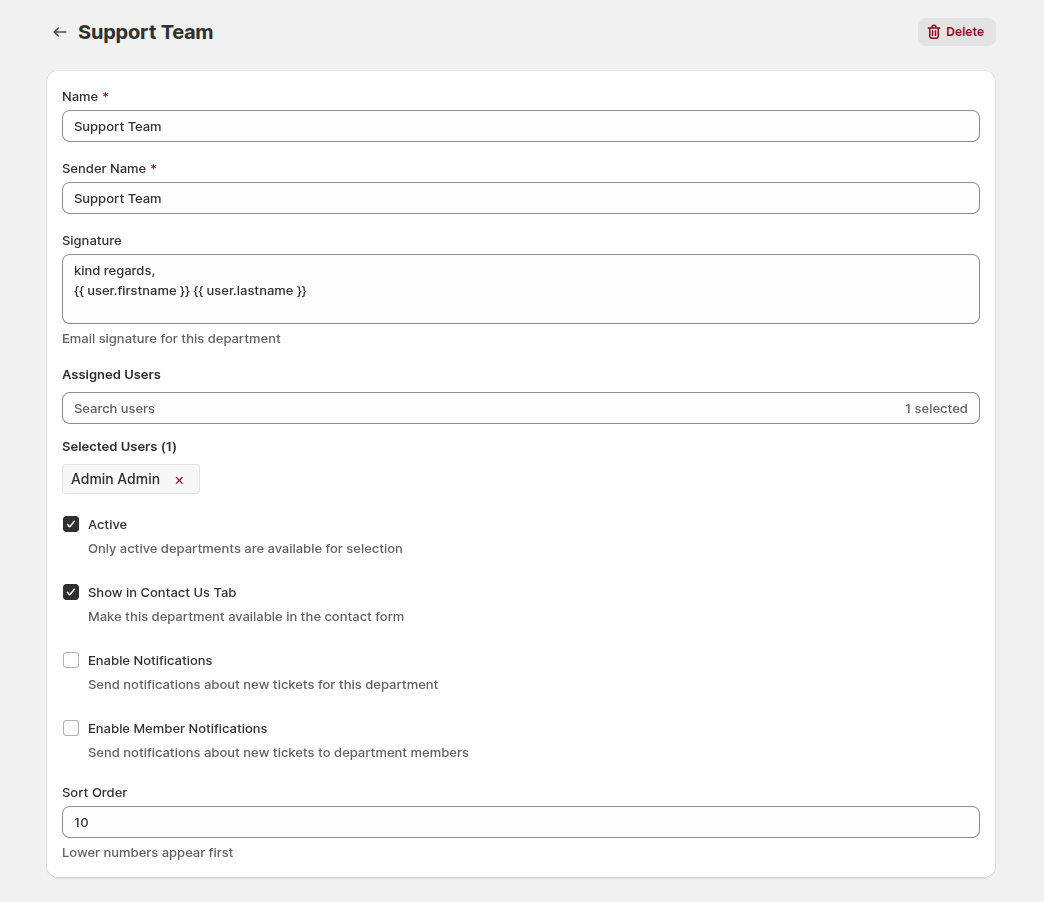
Name: define the name of the department. Clear naming helps both agents and customers identify the appropriate team for their inquiries.
Sender Name: set the default sender name for emails sent from this department. Using a recognizable sender improves trust and clarity in communications.
Signature: create a default email signature for this department using text and dynamic placeholders. A consistent signature maintains professionalism and reinforces your brand.
You can use dynamic variables {{ user.firstname }} {{ user.lastname }} to automatically include the agent's name in outgoing emails
Assigned Users: select which users belong to this department. Only active users are available for selection. Properly assigning users ensures tickets are routed to the right agents.
Show in Contact Us Tab: enable this option to make the department available in the storefront contact form. This allows customers to direct their inquiries to the most relevant team.
Enable Notifications: toggle notifications for new tickets in this department. Keeping the team informed of new tickets ensures timely responses.
Enable Member Notifications: send notifications about new tickets to all members assigned to this department. This feature helps agents stay up to date on incoming requests.
Sort Order: define the department's display order in lists and forms. Lower numbers appear first, allowing you to prioritize important departments in customer-facing forms.